Softphone
Softphone
on the Axion Customer Portal.
What is a 'Softphone'
A softphone is a software-based phone that lets you make and receive phone calls using your computer, tablet, or smartphone (VIA our Noixa app) instead of a physical desk phone. It connects to Axion systems over the internet and functions just like a traditional office phone.
With a softphone, users can place calls, answer calls, check voicemail, transfer calls, and use other features directly from an app or browser—whether they’re in the office or working remotely.
Softphones are ideal for remote work, mobile users, and anyone who wants the flexibility of using their extension without being tied to a physical phone.
How do I...
For new users we recommend checking our Tutorial
User
As stated earlier we would need a valid email address to even create the user. Next we would need to tie this user to an extension in the Customer Portal. This allows the Softphone to bind with an extension in order to be on the network.
Privileges
In order to use the softphone you have to have a few things set up in the Customer Portal. First you will need a user account created and in order to do that we will need an email address to send the verification/account set up email to. Privileges needed in order to use the softphone are in the picture below.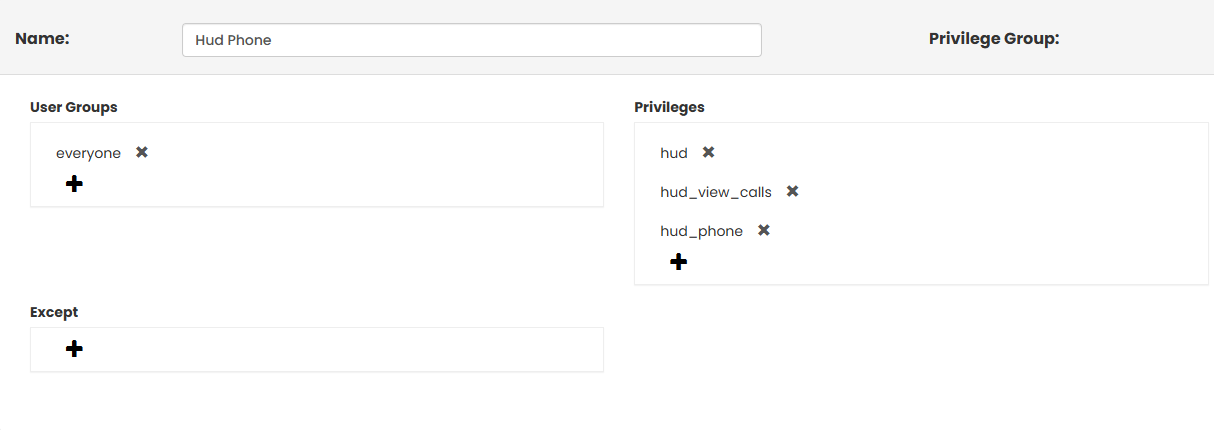
User groups
Are a way to put users (extensions) into simple groups so they’re easier to manage. Instead of setting options for each user one at a time, you can change settings for the group and everyone in that group gets the same access.
Think of User Groups like folders:
- Put similar users together (Sales, Support, Office Staff, etc.)
- Give the group access to certain features
- Remove or add users without redoing settings every time
User Groups are most commonly used to control:
- What users can see and do in the Customer Portal
- Basic permissions and access levels
User Groups do not control how calls are routed. They are only used for organizing users and managing access.
Troubleshooting
-Try logging out of your user on CP - Click your name top right of page then click logout at the bottom of that menu.
-Clear your browser cache- Not sure how to? Click Here