HIVE Ring Groups
HIVE: Ring Groups
The Ring Group feature is used to send calls to multiple extensions or destinations either simultaneously or based on a defined ring strategy. This will create a single new extension number on the system that call routes can be directed to (such as from an IVR option) or that internal users can dial. It can also be used to send calls to outside numbers, similar to misc destinations, but allowing more options for how the call rings, how the outbound caller ID is displayed, and the option to set a destination if the outside number(s) do not answer.
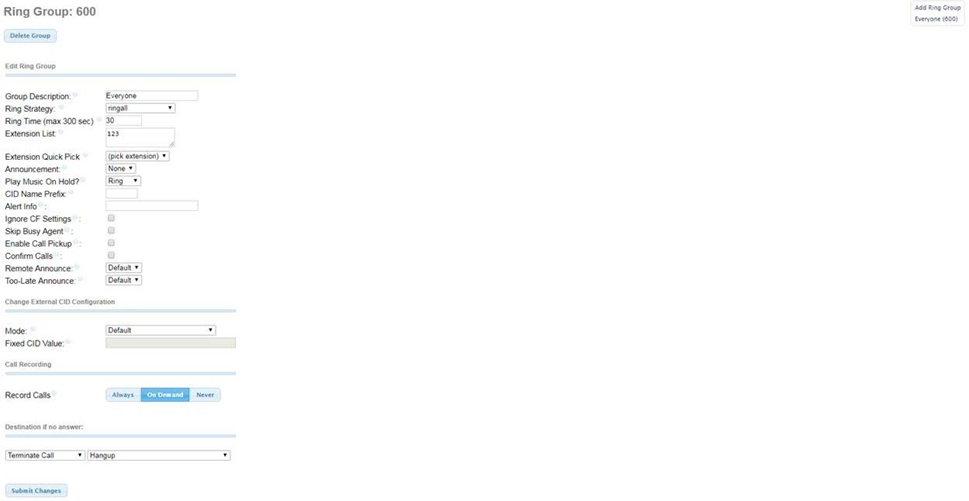
Option to "Add Ring Group" and a list of present Ring Groups are displayed at the top right side of the screen.
When adding a Ring Group this option displays
Ring-Group Number: (Default: the next available number after the current highest numbered ring group) You can manually define the ring group number here. This will be a dial able number available to the system. Commonly this is not changed however if you wanted to setup an “internal code” to reach for example a support group, you can define the number your internal users will dial here.
Ring Group settings are displays on the left side of the screen
Delete Group Button: Clicking this will delete this Ring Group and remove it from the system.
Used as Destination for <#> Object: This will display showing the number of other system features that have statically configured this Ring Group as a destination (IVRs, inbound routes, etc). You can view a list of the specific destinations it's referencing by mousing over the light blue dot just to the right of this alert.
Edit Ring Group
Group Description: (Default: <blank>) Text entered here will be used as the name for this IVR and display in the list at the top right of the screen
Ring Strategy: (Default: ringall) Drop down displaying options for how the Extension List will be rung.
- ringall: ring all available numbers in Extension List simultaneously for duration set in Ring Time.
- hunt: take turns ringing each available extension in the order listed in the Extension List. 1 extension will be rung for the Ring Time, then stop, followed by the next extensions for the Ring Time until all extensions have been rung. This will result in a total ring time of the Ring Time x the number of entries in the Extension List.
- memoryhunt: ring first extension in the Extension List, then ring the 1st and 2nd extension, then ring 1st 2nd and 3rd extension in the list.... etc, also resulting in a total ring time of Ring Time x Number of Extension List entries.
- *-prim: these modes act as described above. However, if the primary extension (first in list) is occupied, the other extensions will not be rung. If the primary is FreePBX DND, it won't be rung. If the primary is FreePBX CF unconditional, then all will be rung
- firstavailable: ring only the first available channel(registered extension) attempting the list in order from top to bottom. If that user is on the phone, it will still be rung on their second line is available.
- firstnotonphone: similar to first available however if that first registered extensions is on a call, it will be skipped and not run, and the next available extensions that is no on a call will be rung instead.
Ring Time (max 300 sec): (Default: 30) This will set the amount of time (seconds) that the Extension List is rung using the ring strategy chosen.
Extension List: (Default: <blank>) List of extensions to bring rung (1 per line). You can ring internal extensions by entering them normally(ex: 100 for extension 100) or external numbers in this list by following them with a pound (#), (ex: 8005551212#).
Extension Quick Pick: Drop down including list of extensions on the system. By selecting one of the extensions, it will be added to the Extension List above this.
Announcement: (Default: None) Message to be played to caller before ringing Extension List. Drop down lists all recordings from System Recordings.
Play Music On Hold?: (Default: Ring) Defines tone to be heard by caller when the Extension List is being rung.
CID Name Prefix: (Default: <blank>) Text entered here will prepend the caller ID displayed on the receiving extension's phone. For example, a prefix of “Sales:” would make a caller ID name of “John Doe” appear as “Sales: John Doe.” This will not affect the caller ID that displays on external numbers that are rung if any are included in the Extension List.
Alert Info: (Default: <blank>) Text entered here will be transmitted to the receiving extension (any listed in the Extension List). This is used to affect the ring tone played on the receiving phone (ex ring1 ring2 silent etc)
Ignore CF Settings (Default: unchecked) When this box is checked, call forwarding settings either within the User Portal or from the phone device will be ignored in addition to the extension with the forwarding setting not being rung. If this is checked, and there is a # after an extension number in the Extension List, that extensions follow me settings will still be honored which can result in call forward like behavior occurring.
Skip Busy Agent (Default: unchecked) When this box is checked, extensions who are actively on a call, will not be rung, regardless if that extension has call waiting enabled or not. However, if an extension is listed in the Extension List with a # (example 109#) then the status of that agent will not be checked regardless of this options setting, and the call will be sent to that phone as normal.
Enable Call Pickup (Default: unchecked) When this box is checked, a directed call pickup can be performed on this group by dialing the directed call pickup feature code (listed in Admin > Feature Codes) (Default is **) followed by the ring group number of this ring group. This will allow extensions not listed in this ring group, to answer calls to this group. If this is unchecked, this feature will not work, however, directed call pickups to extensions included in this ring group will still function regardless of the state of this checkbox.
Confirm Calls: (Default: unchecked) Checking this box will enable call confirmation when ringing external numbers through the Extension List. When enabled, the receiving external number will hear the defined announcement (see Remote Announce and Too-Late Announce) Upon hearing this message, if the receiving party dials 1, they'll be connected to the calling party. If they dial 2 or nothing at all, they'll hear the defined Too-Late announcement. Checking this box will also change how call records related to this ring group are displayed in CDR Reports. You’ll still see a call with a destination of this ring group number however you’ll additional see individual call records showing as LC-<ext#> showing the calls to each extension in the Extension List.
Remote Announce: (Default: Default) This is the message that plays to the receiving external party when answering a call. The Default message is: "You have an incoming call, press 1 to accept, 2 to decline, press 3 to hear the caller id information if available."
Too-Late Announce: (Default: Default) This is the message that plays to the receiving external party when answering a call and the call has already reached the end of the ring time. The Default message is:
"I'm sorry, the incoming call is no longer available, or has been answered by someone else."
Change External CID Configuration
Mode: (Default: Default) Drop down with options for how the Caller ID will be displayed to any extensions numbers included in the Extension List.
- Default: Transmits the Callers CID if allowed by the trunk. (If caller is internal extensions, the trunks outbound caller ID will be displayed, or that extensions outbound caller ID if defined.
- Fixed CID Value: Always transmit the Fixed CID Value below.
- Outside Calls Fixed CID Value: Transmit the Fixed CID Value below on calls that come in from outside only. Internal extension to extension calls will continue to operate in default mode.
- Use Dialed Number: Transmit the number that was dialed as the CID for calls coming from outside. Internal extension to extension calls will continue to operate in default mode. There must be a DID on the inbound route for this. This will be BLOCKED on trunks that block foreign CallerID.
- Force Dialed Number: Transmit the number that was dialed as the CID for calls coming from outside. Internal extension to extension calls will continue to operate in default mode. There must be a DID on the inbound route for this. This WILL be transmitted on trunks that block foreign CallerID.
Fixed CID Value: (Default: <blank>) For use when either Fixed CID Value or Outside Calls Fixed CID Value is chosen in the above Mode drop down box.
Call Recording
Record Calls: (Default: On Demand) There are 3 options that you can choose when adjusting the call recording settings for a ring group: Always, On Demand, or Never. Choosing Always will set this call to be recorded. The On Demand option, the default setting, will allow this call to be recorded if the receiving extension entered the In-Call Asterisk Toggle Call Recording code to activate this provided the InCall Asterisk Toggle Call Recording feature is enabled within Admin > Feature Codes . The Never option will stop this call from being recorded, even if the receiving extension attempts to record it via the previously mentioned code.
Destination if no answer
(Default: ==choose one==): Drop down allowing you to select the destination where caller is sent if the call is not answered.